RetopoFlow 4
Sketch-based retopology tools that let you draw clean, low-poly topology directly over a sculpt or scan.
Not tested hands-on. Based on the creator’s documentation, demo videos, changelog and buyer feedback.

Cover image: Orange Turbine, from the original product page.
Links to Superhive on this page are affiliate links. If you buy through them I earn a commission, at no extra cost to you.
What it does
Retopology means building a clean, light mesh on top of a heavy one so it can be rigged, UV-mapped and used in real time. Retopoflow makes that job feel closer to drawing: you sketch strokes on the surface and the add-on turns them into quads that snap to the original model.
Key features
- Sketch-based tools for laying down edge loops and strips directly on the surface.
- Contours for cylindrical shapes like arms, legs and fingers.
- PolyStrips for flowing strips around eyes, mouths and panels.
- PolyPen for placing individual vertices and faces with precision.
- Patches to fill holes between existing loops.
- Relax and Tweak brushes to smooth and adjust the new topology while keeping it on the surface.
- Works in Blender's Edit Mode, so the result is a normal mesh.
Things to check before buying
Retopoflow speeds up retopology but does not automate it; you still decide where loops go. Reviews from users describe the latest version as much easier to pick up than Blender's built-in tools.
Strengths
- Drawing-style tools make retopology feel less tedious
- Works inside Blender's Edit Mode
- Handles sculpts, scans and auto-generated meshes
Worth knowing
- Still a manual process that takes time to learn
- Big sculpts may need decimating first for speed
Who it's for
Sculptors and character artists who need animation-ready or game-ready topology from high-poly sculpts and scans.
From the product page


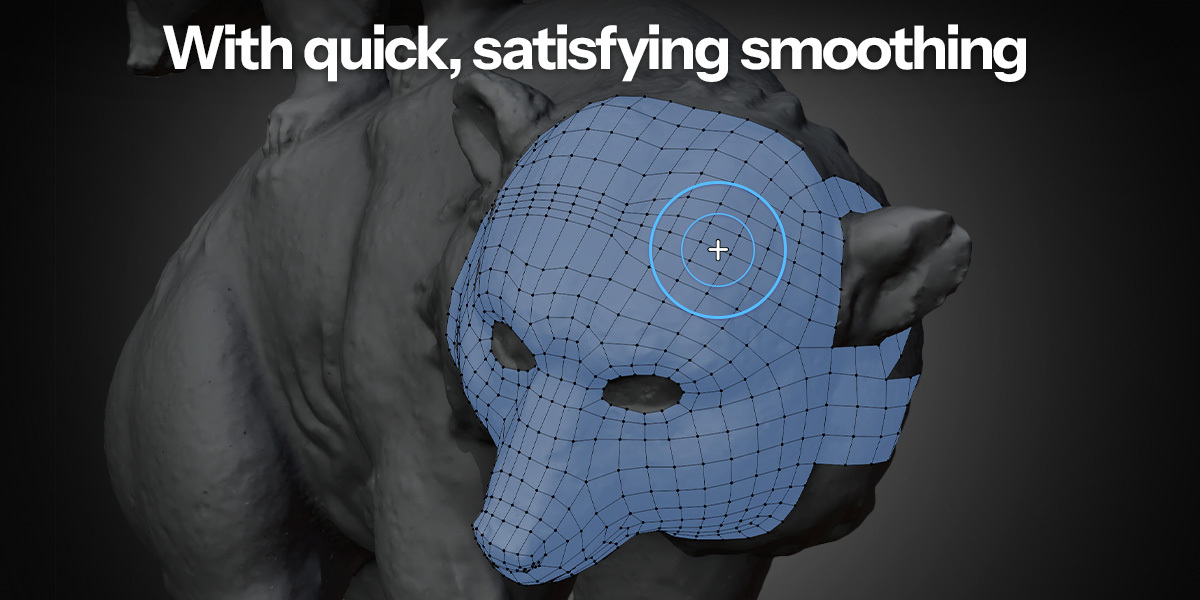

Images by Orange Turbine, shown from the Superhive product page.
RetopoFlow 4
Check the current price, version support and changelog on the creator's page.
See price on SuperhiveAffiliate link. How this works